

JAMB O’Level Result Verification and Upload: How Candidates Can Complete the Process From Home
Good news for candidates preparing for admission!
Good news for candidates! 📢 You can now verify and upload your O’Level result from the comfort of your home. We’ve put together a simple guide to help you understand the new process, from getting your Verification Code to completing your upload on JAMB e-Facility. Watch and…
— Naijamixed.com.ng (@Naijamixed) August 25, 2026
Candidates who need to provide or update their O’Level results on the Joint Admissions and Matriculation Board (JAMB) portal should pay close attention to the current verification and upload process.
JAMB continues to require candidates to have their O’Level results properly supplied on the Board’s platform. The Board’s official guidance states that candidates awaiting results should upload them once they become available, while candidates’ claimed qualifications may need to be verified before admission processing is completed.
In addition, JAMB’s 2026 registration information refers to an O’Level Verification Code/Upload PIN used to facilitate automatic uploading of O’Level and/or A’Level grades.
What Is the JAMB O’Level Result Upload and Verification Process?
The O’Level upload process is the procedure through which candidates provide their WAEC, NECO, NABTEB or other recognised O’Level qualification information for use in JAMB’s admission process.
This is important because having an examination result alone does not necessarily mean that JAMB has the result recorded on your profile.
JAMB has repeatedly stated that candidates awaiting results should upload their results to the Board’s portal when the results become available. The Board also states that candidates will not be considered for admission in relevant circumstances where the required result has not been uploaded.
What Is the O’Level Verification Code?
The O’Level Verification Code is used to facilitate verification and/or automatic uploading of candidates’ O’Level information.
JAMB’s 2026 materials reference an O-Level Verification Code obtained from the relevant examination body, with the published registration instructions specifying charges depending on whether a candidate is verifying one or two sittings in the particular registration process described.
Because the exact process and charges can differ according to the examination body and JAMB service being used, candidates should rely on the instructions displayed on the official JAMB portal or from the relevant examination body when obtaining a code.
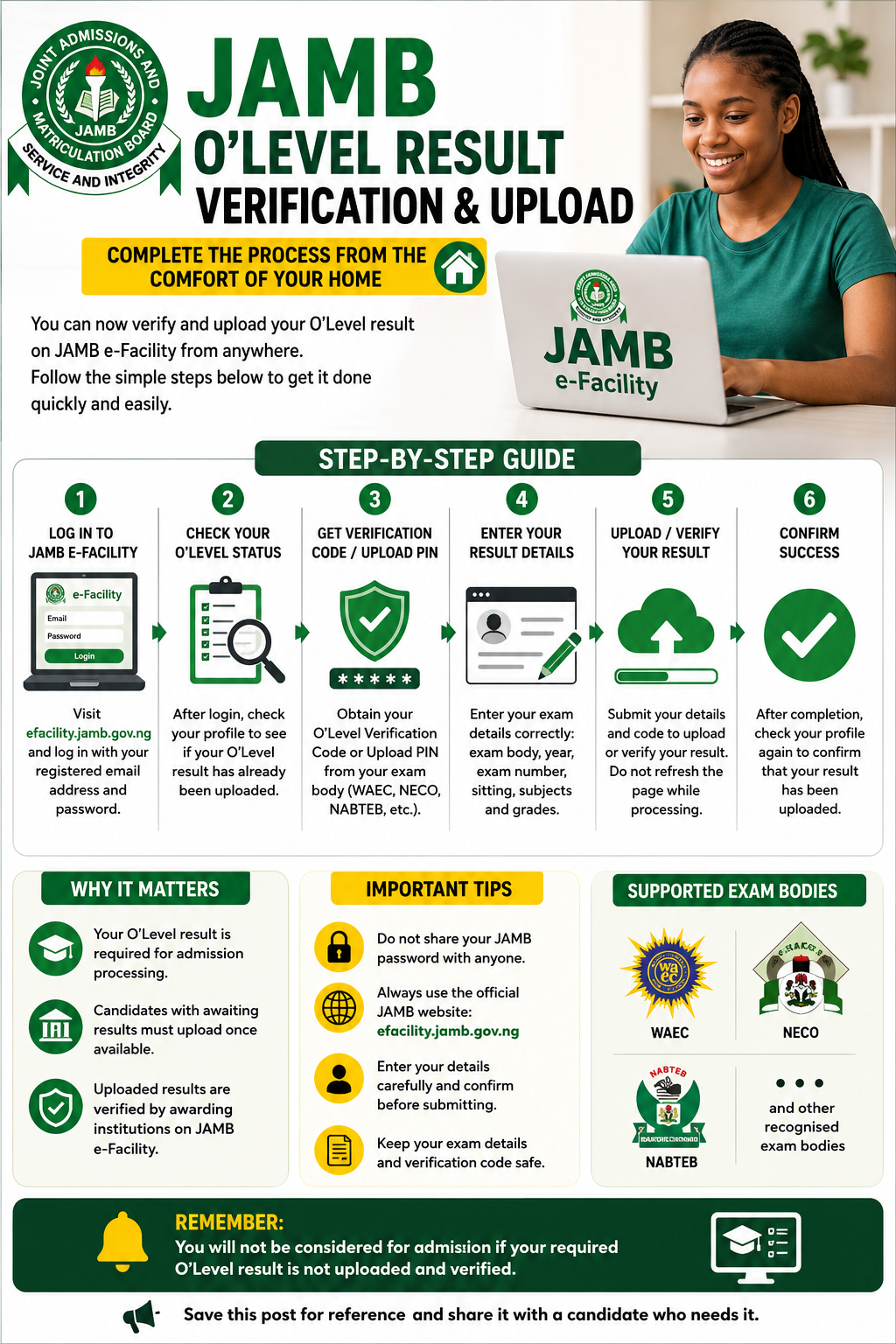
How to Start the Process
Candidates can begin by accessing their JAMB e-Facility account.
The official JAMB e-Facility login page is available at efacility.jamb.gov.ng and requires the candidate’s registered email address and password.
After logging in, candidates should carefully check the information already displayed on their profile before attempting to add or update an O’Level result.
Step-by-Step Guide to O’Level Verification and Upload
Step 1: Log in to JAMB e-Facility
Visit the official JAMB e-Facility portal and sign in with the email address and password connected to your JAMB profile.
Make sure you are using the official JAMB website and not a third-party website requesting your login details.
Step 2: Check Your Existing O’Level Information
After logging in, check whether an O’Level result has already been recorded on your profile.
Candidates should avoid unnecessarily submitting duplicate information where their result is already correctly available.
Also check the examination body, examination year, number of sittings and the grades entered.
Step 3: Obtain the Required Verification Code or Upload PIN
Where the current procedure requires an O’Level Verification Code or Upload PIN, candidates should obtain the required code through the appropriate official channel.
JAMB’s FAQ specifically refers to an Upload PIN for automatic uploading of O/L and/or A/L grades.
For certain 2026 processes, JAMB also specifically refers to an O-Level Verification Code obtained from the examination body before the result can be uploaded.
Step 4: Enter the Required Result Details
Depending on the procedure shown on the candidate’s profile, enter the requested examination information carefully.
This may include details such as:
- Examination body
- Examination year
- Candidate’s examination number
- Number of sittings
- Subjects and grades
- Verification or upload code
Make sure the information matches the actual examination record.
Step 5: Complete the Upload or Verification
Follow the instructions displayed on the JAMB portal to submit the information.
Do not refresh or close the page repeatedly while a transaction or upload is being processed.
After completion, check the candidate’s profile again to confirm that the result has been recorded correctly.
Can Candidates Do the Process From Home?
The availability of a particular online verification or upload procedure depends on the candidate’s situation and the specific service JAMB has made available.
The major advantage of the current online process is that candidates can carry out relevant parts of their O’Level verification and upload activities through JAMB’s electronic platform rather than assuming that every update must be handled manually at a physical centre.
However, candidates should follow the exact instructions attached to their profile and the current JAMB procedure.
What Candidates Should Know About Awaiting Results
Candidates who registered with an awaiting result should not simply leave the result section untouched after their examination result is released.
JAMB’s official FAQ advises candidates awaiting results to upload those results online as soon as they become available.
This is particularly important for admission processing.
JAMB’s CAPS information states that candidates with awaiting O/L results are required to upload their results into the JAMB portal before being considered for admission.
Therefore, candidates who now have their WAEC, NECO or other accepted result should check their JAMB profile and ensure the result has been properly supplied.
What About Candidates With Two Sittings?
Candidates using two O’Level sittings should provide the information exactly as required by JAMB.
For Direct Entry candidates, JAMB’s 2026 published requirements refer to recognised O’Level qualifications obtained in not more than two sittings, subject to the applicable entry requirements.
Candidates should therefore ensure that both results are accurately declared where their admission requirements permit two sittings.
What Happens After Uploading the Result?
Uploading a result does not necessarily mean that every admission-related verification has immediately been completed.
The result may still be subject to verification and processing.
JAMB’s 2026 Direct Entry guidance, for example, states that candidates will not be processed for admission until claimed results have been uploaded and verified by the relevant awarding institutions on the JAMB e-Facility platform.
This means candidates should not panic if the result does not immediately produce every expected admission status update.
Important Mistakes to Avoid
Do Not Use Unofficial Websites
Always confirm that you are working on an official JAMB platform before entering your personal information.
JAMB’s official e-Facility login is hosted on the JAMB domain.
Do Not Give Out Your Password
JAMB advises candidates to keep their security information confidential and states that candidates should not give their passwords to registration centres.
Your JAMB login details should remain private.
Check Your Details Before Submission
An error in an examination number, examination year, sitting or grade information can create unnecessary problems later.
Take time to check everything before completing the submission.
Do Not Assume That Your Result Is Automatically Available to JAMB
Receiving your WAEC, NECO or NABTEB result does not necessarily mean that JAMB already has the result attached to your candidate profile.
Always verify your JAMB profile.
Why the O’Level Upload Matters for Admission
Your O’Level qualification is an important part of the admission process.
JAMB’s published admission information includes O’Level requirements, including the required credits in relevant subjects, while CAPS requires awaiting-result candidates to supply their results before they can be considered for admission.
For some candidates, failure to upload or properly verify the result can therefore delay or affect admission processing.
What Candidates Should Do Now
Candidates should log in to their JAMB e-Facility profile and check their O’Level status.
If the result is missing, awaiting upload or requires verification, follow the current instructions displayed by JAMB and the relevant examination body.
After completing the process, check the profile again and keep your examination details and verification information safe.
Final Word
The O’Level result upload and verification process is an important step for candidates seeking admission through JAMB.
With JAMB’s electronic services, candidates can handle relevant parts of the process online, but the exact steps depend on the candidate’s registration status, examination body and the service available on the JAMB platform.
Candidates should therefore avoid relying on unofficial instructions or unverified social-media claims. Always confirm the latest procedure directly through the official JAMB e-Facility and JAMB’s published guidance.
Have you successfully verified or uploaded your O’Level result? Share this guide with another candidate who may need it.














 English (US) ·